Accessibility audits and fixes for online stores
Find and fix what stops shoppers with disabilities from buying. We test against WCAG 2.2 AA, the standard laws like the ADA, the EAA and AODA point to. A specialist confirms every problem, and we fix it in your theme code.
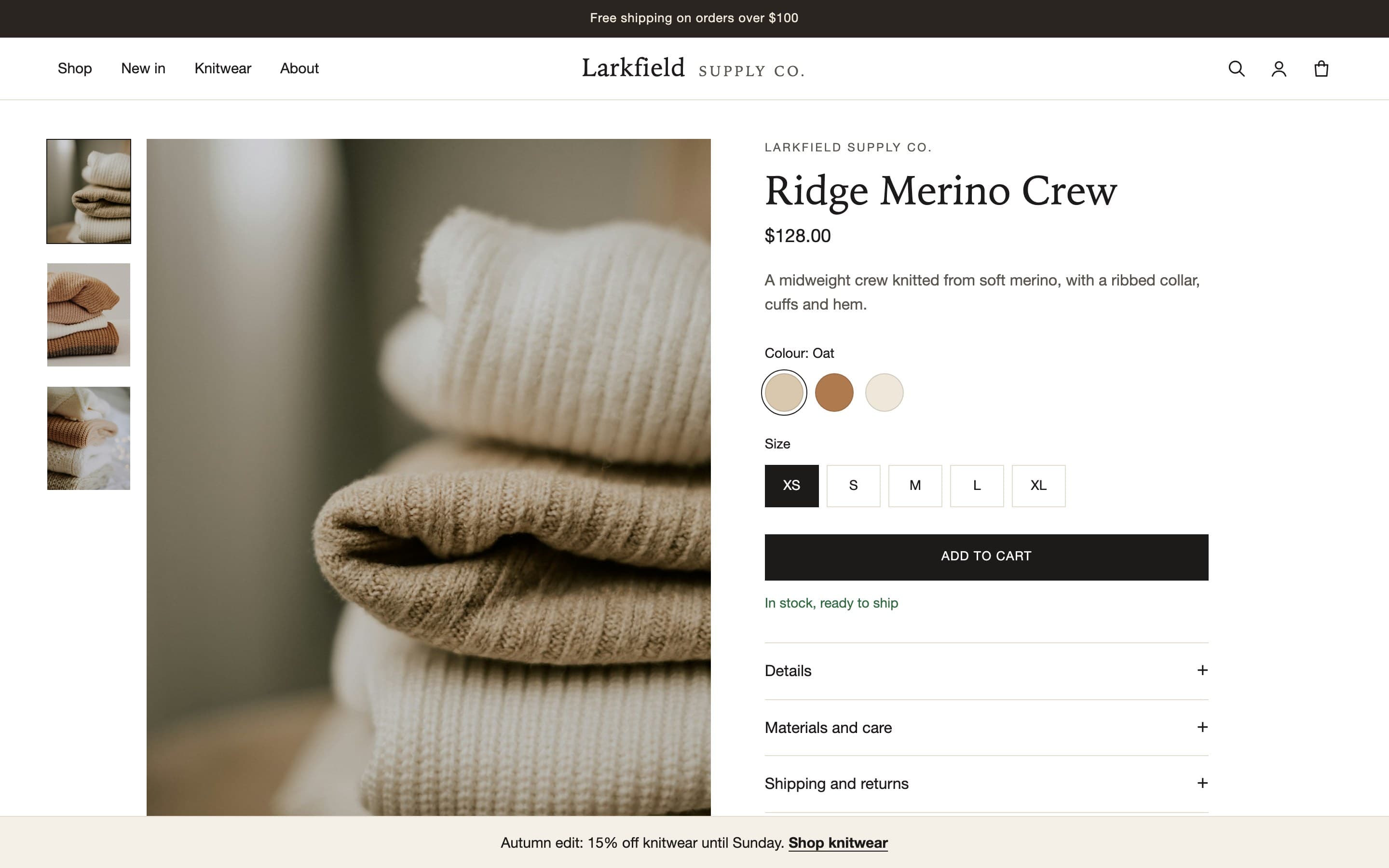
Screenshots show a demo store we built with the problems we find most often.
Why it matters for your store
When a store only works with a mouse, shoppers who use a keyboard or a screen reader can’t finish buying. They leave, and some take legal action.
28.7%
of US adults report having a disability.
95.9%
of the top one million home pages had WCAG failures that automated tools could detect. Online shops averaged 71 errors a page.
3,117
website accessibility lawsuits were filed in US federal courts in 2025, up 27% on 2024. State court cases and demand letters come on top.
Related legislation
Laws in the US, Canada, the UK and the EU expect many online stores to work for people with disabilities. Most of them point to WCAG, the standard we test against.
We test and fix against WCAG 2.2 AA. We don’t promise compliance with any law, and our report isn’t legal advice. It’s a dated record of what was tested and fixed.
ADA Title III
United States: businesses open to the public
Unruh Civil Rights Act
California
New York human rights laws
New York State and City
European Accessibility Act
EU online shops since June 2025, except microenterprises
AODA
Ontario: organisations with 50 or more employees
Accessible Canada Act
Canada: federally regulated businesses
Equality Act 2010
United Kingdom: service providers, including websites
EN 301 549
The European standard, built on WCAG
WCAG 2.2 AA
The W3C standard we test against
What we find
These problems don’t show up when you click around your own store. They show up when a shopper can’t use a mouse.
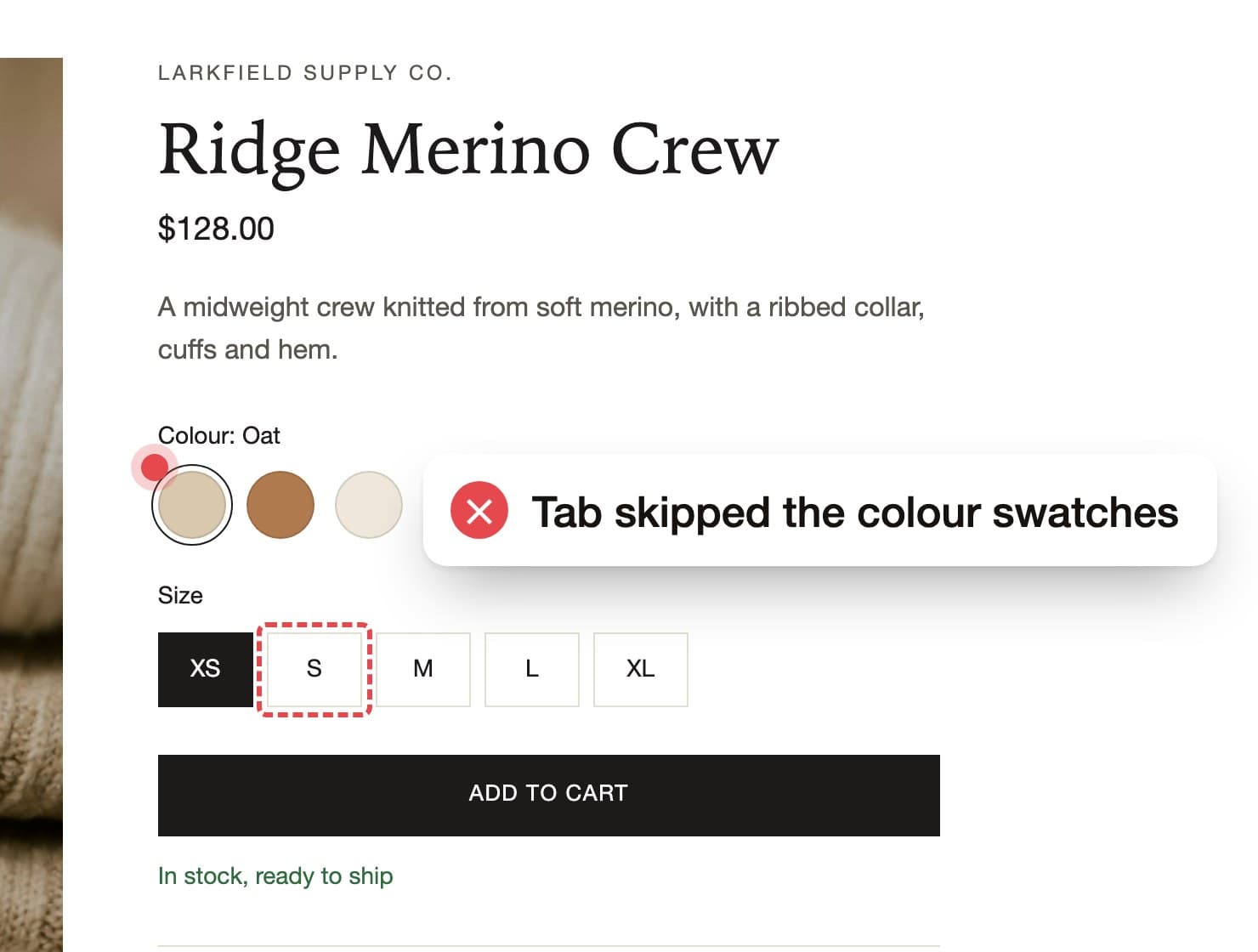
Colours can’t be chosen with a keyboard
Tab skips the colour swatches, so a keyboard shopper can’t pick a colour. We turn them into real options that work with the arrow keys.
Before 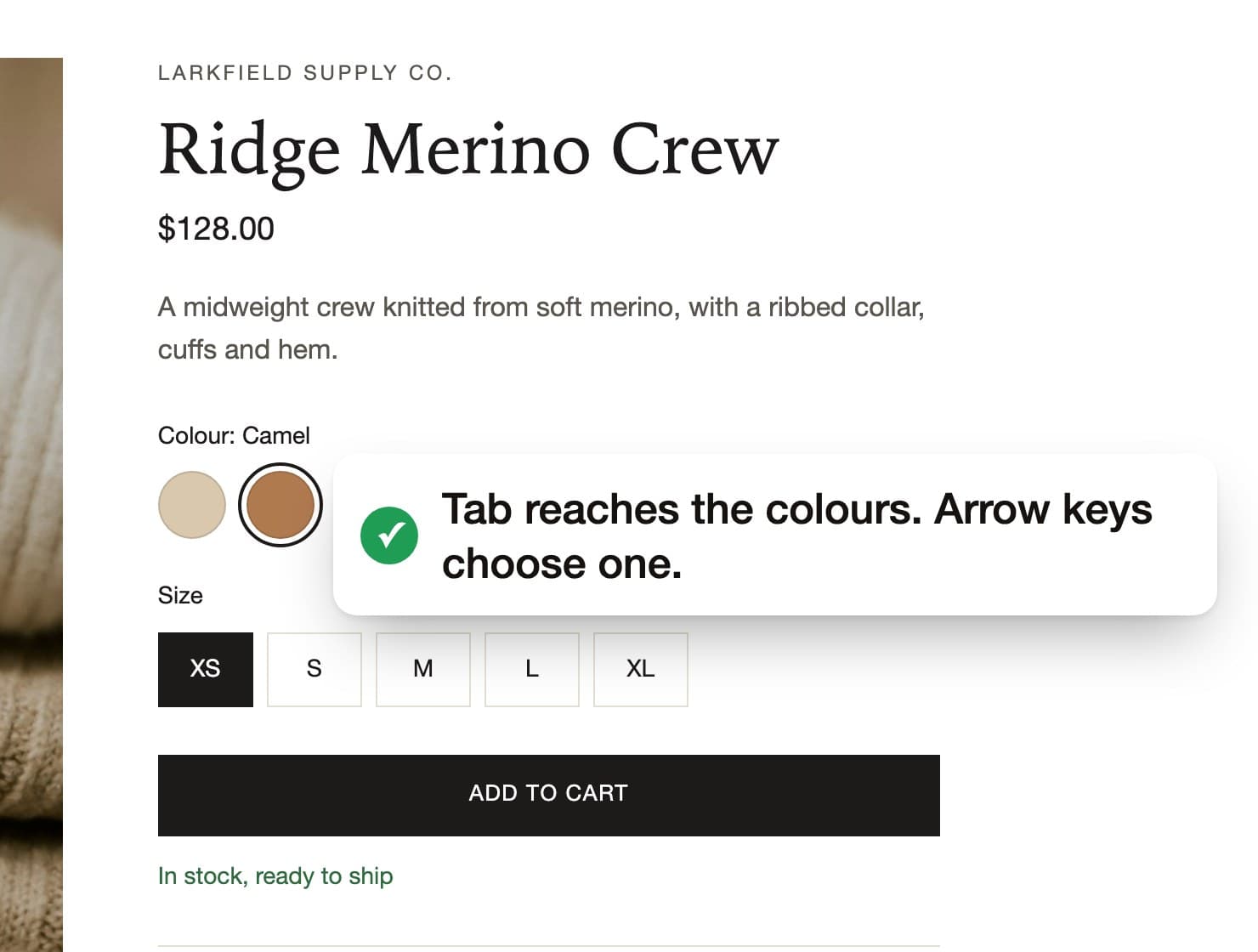
After Focus escapes the cart
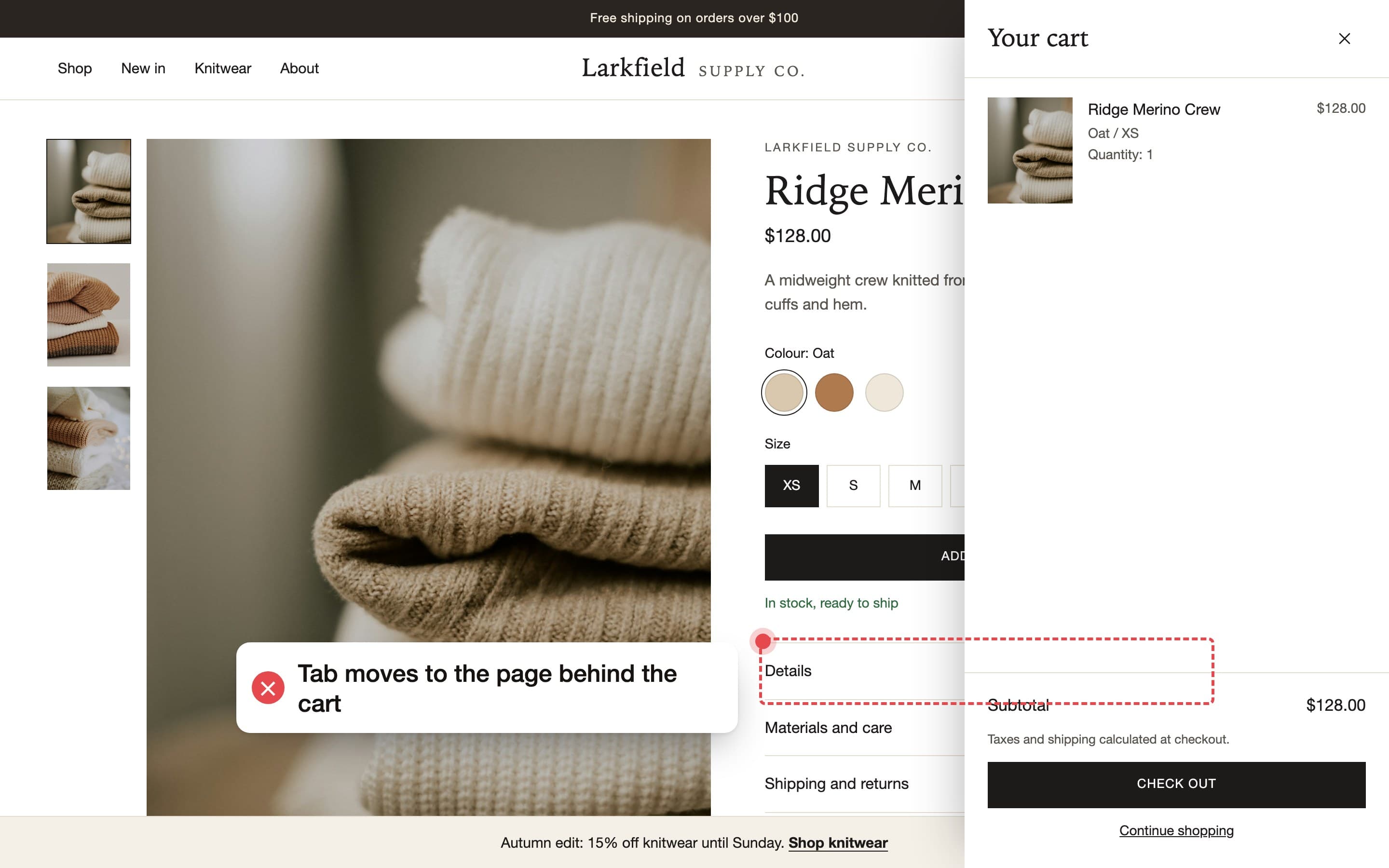
The cart opens, but focus stays on the page behind it, so Check out is out of reach. We keep focus inside the cart until it closes.
Before 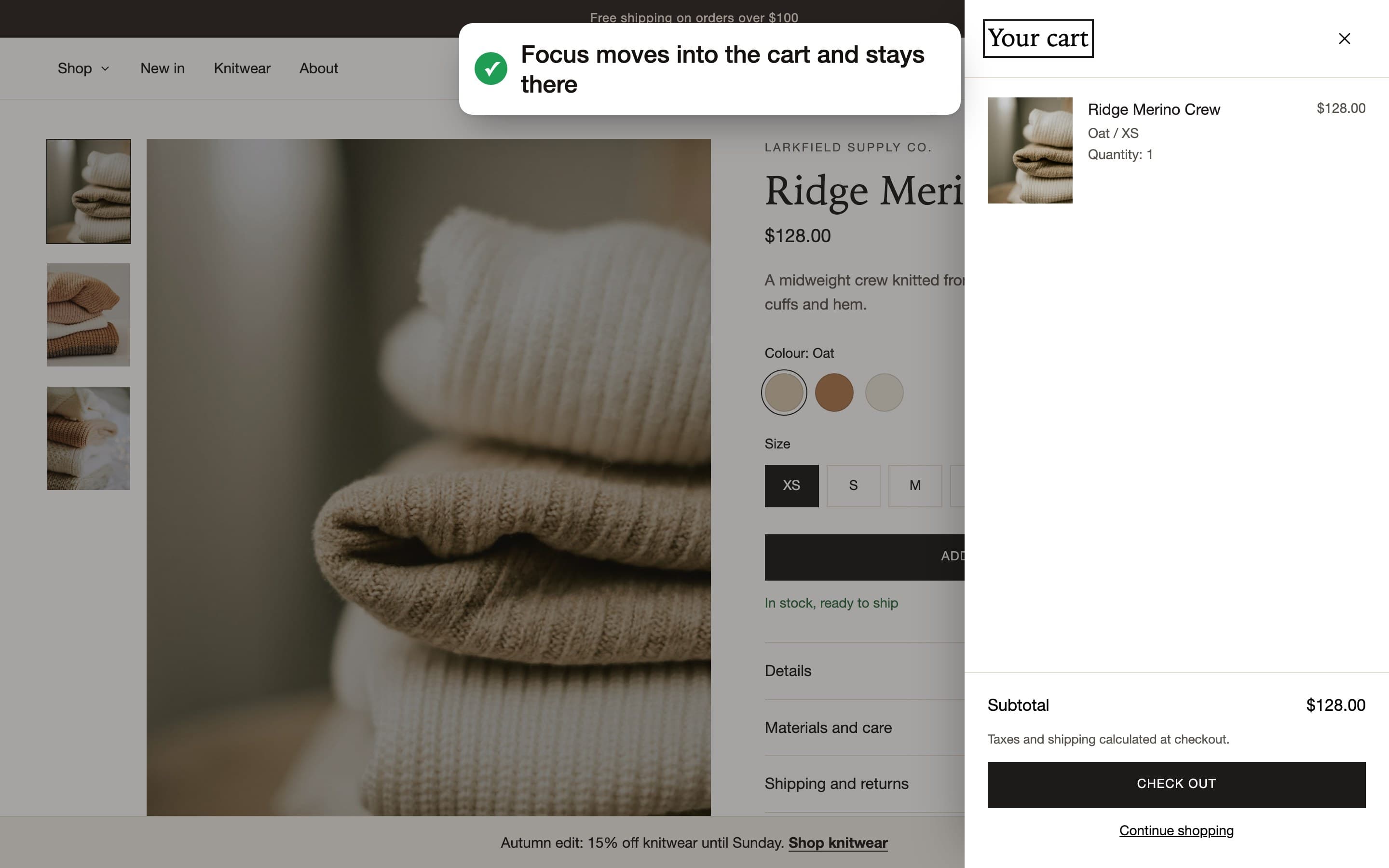
After The menu only opens with a mouse
Pointing at Shop opens the menu. Pressing Tab never does, so its links can’t be reached. We make it open with Enter.
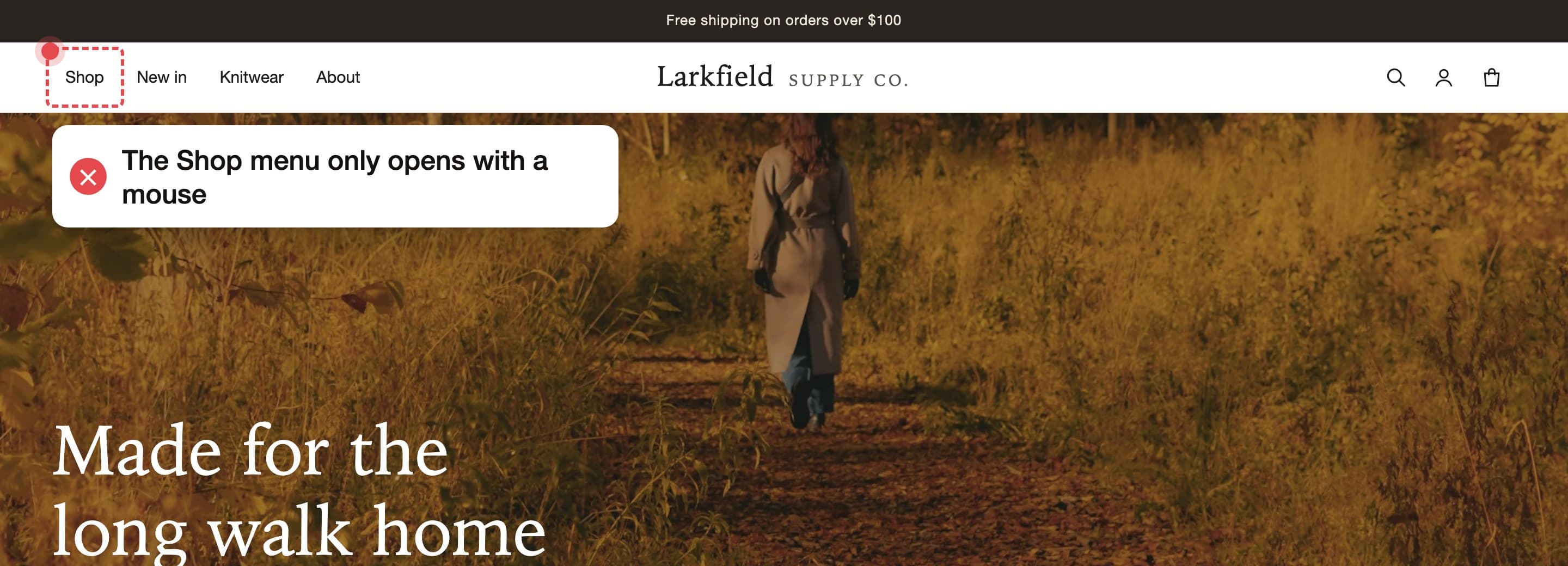
Before 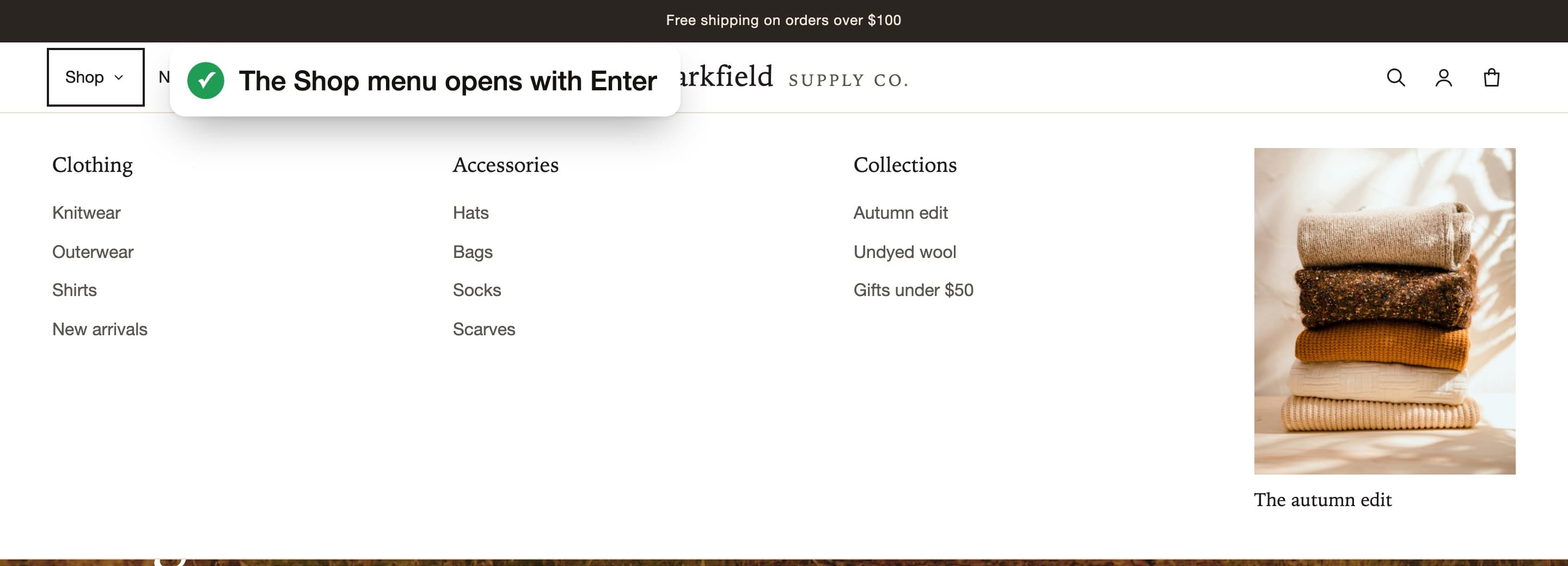
After
How it works
Audit
Automated checks of your home, collection, product and cart pages find the problems, and a specialist confirms each one. Free, in 2 business days.
Fix
We fix every problem from your audit in your theme code for one fixed price. You approve the changes before they go live.
Re-test
We test again and send you a dated report of what was broken and what changed.
Monitor
Daily automated checks and up to 2 hours of fixes a month keep your store working after updates.
Daily checks, monthly fixes
Theme updates and new apps can break things again. Monitoring catches it.
$149 a month
See full pricing- Every day
- Automated checks of your menu, search, product pages and cart
- Every day
- An alert the same day if an update or new app breaks something
- Every month
- Up to 2 hours of fixes, with a short report
- Any time
- Anything over 2 hours quoted at a fixed price before we start
What owners ask
Do you need access to my store?
Not for the free audit. We test your public store like any shopper would. If you hire us to fix things on Shopify, you approve a collaborator request, and you can remove our access at any time. On custom-built stores, your developers decide how we work with their code.
Will this make my store ADA compliant?
No one can honestly promise that, and we won’t. The ADA doesn’t include a technical checklist for store websites; most experts use the Web Content Accessibility Guidelines (WCAG). We test against WCAG 2.2 AA on the journeys that matter most, fix what we find, and give you a dated record of the work.
Does this mean we won’t get a legal claim?
No. Nothing we do can stop someone sending a demand letter or filing a claim. What we do is remove real barriers from your shopping journey and give you a dated record of what we tested and changed. What that record means for a legal claim is a question for a lawyer.
Which laws apply to my store?
It depends on where you and your customers are. In the US, the ADA covers businesses open to the public, and the Department of Justice points to WCAG; California and New York add their own laws. The European Accessibility Act has covered online shops selling to EU consumers since 28 June 2025, except microenterprises. Ontario’s AODA covers organisations with 50 or more employees. We’re not lawyers, so check with one about your situation.
We’re a small business, or we’re not in the EU. Does the European Accessibility Act apply to us?
Ask a lawyer about your situation. Here is what the Act itself says. It applies to e-commerce services provided to consumers since 28 June 2025. Microenterprises are exempt, and the Act defines one as having fewer than 10 staff and either an annual turnover or a balance sheet total of no more than €2 million, so headcount alone doesn’t decide it.
Do you use overlays or widgets?
No. We change your store’s code. Overlays add a toolbar on top and leave the broken code underneath; in 2025 the FTC fined one overlay maker $1 million over claims that its product made websites compliant.
We already use an accessibility widget. Does that change anything?
Not for the audit. We test with your widget loaded, the way shoppers see your store, so the problems in your report are there even with it. A widget changes the page after it loads, but the problems come from your theme’s code, and that’s where we fix them. We don’t ask you to remove it. Whether you keep it afterwards is up to you.
Our theme is from the Shopify Theme Store. Isn’t it already accessible?
Partly. Shopify reviews Theme Store themes against accessibility requirements, including keyboard access, visible focus and colour contrast, and asks for an average Lighthouse accessibility score of at least 90. Lighthouse is an automated check, so it can’t find everything. Your store also keeps changing after the theme is installed: the colours you choose, custom sections, and apps for reviews, pop-ups, upsells and chat. Many of the problems we find come from those.
Is the testing automated?
Partly. The free audit uses automated checks: axe-core, an open-source accessibility engine, plus two checks of our own. They find common problems quickly, but they can’t tell whether an image description fits the image or whether a shopper can actually finish buying. So a specialist confirms every problem by hand, runs the manual audit with a keyboard and screen readers, and reviews every code change.
Could our own developer do this?
Yes. The report is written for developers: each problem has its WCAG criterion, its priority, where it is in your store and a link explaining the fix, and it’s yours to keep either way. What automated checks can’t see needs someone testing by hand with a keyboard and screen readers. Our manual audit does that part.
Will this change how our store looks?
Very little. Most fixes can’t be seen: names for buttons, labels for fields, focus order, and what screen readers are told. The visible ones are mostly focus outlines and text colours too faint to read. For those we show you options that fit your brand, and nothing visible changes without your approval.
Could anything break while you work?
We never edit your live theme. We work on an unpublished copy, you preview and approve it, and you publish it when you’re ready. Your previous theme stays in your theme library, so you can switch back. The free audit and the manual audit only need your store’s address. If we can’t tell what an image shows from the image or the product details, we ask you rather than guess.
We’re redesigning soon. Should we wait?
You don’t need to. Take the free audit now and put the results in your redesign brief: building these into a new theme is easier than fixing them after launch. If the new theme is nearly ready, ask us about testing it before it goes live.
Do you give us a badge or seal for our site?
No. There’s no official badge or seal for the ADA or the European Accessibility Act, and the ones on sale are issued by the companies selling them. What you get instead is the before and after reports from the same checks on the same pages, and a dated record of what was tested, what changed and what’s still open.
What happens when my theme updates or I add an app?
Updates can undo fixes. Monitoring checks your store every day and includes up to 2 hours of fixes a month.
Which platforms do you work with?
Shopify: we fix it for you. WooCommerce: quoted after the free audit. Custom-built stores: we give your developers the exact changes and re-test after they ship. On another platform? Ask us.
Start with a free audit
Send us your store’s address. In 2 business days you get a report of every problem on your home, collection, product and cart pages. No store access needed.
Get a free audit